

Designing a Pipeline Report
Source: CPA Practice Management Forum
The pipeline report can be done on an Excel spreadsheet. See the following sample:
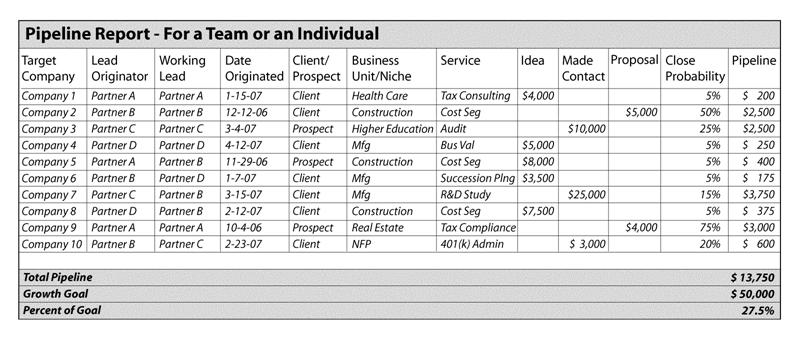
The following columns help measure probable new business in relation to plan:
| Service | You can evaluate whether you are balancing your efforts to generate one-time v. recurring engagements. |
| Idea | Your ballpark estimate of the amount of the engagement where you have not yet communicated with the prospect. |
| Made Contact | Conversations have begun and you can create a broad estimate of the amount of the engagement. |
| Proposal | The prospect has asked for an estimate of the fees. |
| Close Probability |
The probability should be: • No more than 10 percent at the idea stage. • Between 25 percent and 75 percent after the initial contact stage. |
| Pipeline | This amount is the amount times the probability. |
The pipeline report can help you evaluate marketing activities to determine:
- Whether marketing activity is at the right level.
- If you are pursuing the right activities.
- If prospects are being properly cultivated.
- Your closing percentage and whether it is adequate.
- Business developers’ ROI—is the time devoted to practice development profitable?
- Whether the sales cycle is too long—a long sales cycle may indicate inadequate follow-up.
- The number of contacts generally needed to close a sale.
The report can be sorted in a number of ways to help track performance by:
- Lead originator—helps evaluate the work of the originators and determine where leads are coming from.
- Lead—who is working on the leads and what is their track record.
- Business unit/niche—helps evaluate whether each service area is on track to meet its goals.
When people submit information for inclusion on the pipeline report, they are demonstrating their commitment to achieving their goals and are willing to be held accountable for them.
From CPA Practice Management Forum, CCH Incorporated, 800-449-8114, June 2007, p. 5. For the complete article, click here.